Instructions to use CodeSoft/sorbet-mini-experimental with libraries, inference providers, notebooks, and local apps. Follow these links to get started.
- Libraries
- Transformers
How to use CodeSoft/sorbet-mini-experimental with Transformers:
# Use a pipeline as a high-level helper from transformers import pipeline pipe = pipeline("text-generation", model="CodeSoft/sorbet-mini-experimental")# Load model directly from transformers import AutoTokenizer, AutoModelForCausalLM tokenizer = AutoTokenizer.from_pretrained("CodeSoft/sorbet-mini-experimental") model = AutoModelForCausalLM.from_pretrained("CodeSoft/sorbet-mini-experimental", device_map="auto") - Notebooks
- Google Colab
- Kaggle
- Local Apps Settings
- llama.cpp
How to use CodeSoft/sorbet-mini-experimental with llama.cpp:
Install (macOS, Linux)
curl -LsSf https://llama.app/install.sh | sh # Start a local OpenAI-compatible server with a web UI: llama serve -hf CodeSoft/sorbet-mini-experimental:F16 # Run inference directly in the terminal: llama cli -hf CodeSoft/sorbet-mini-experimental:F16
Install from WinGet (Windows)
winget install llama.cpp # Start a local OpenAI-compatible server with a web UI: llama serve -hf CodeSoft/sorbet-mini-experimental:F16 # Run inference directly in the terminal: llama cli -hf CodeSoft/sorbet-mini-experimental:F16
Use pre-built binary
# Download pre-built binary from: # https://github.com/ggerganov/llama.cpp/releases # Start a local OpenAI-compatible server with a web UI: ./llama-server -hf CodeSoft/sorbet-mini-experimental:F16 # Run inference directly in the terminal: ./llama-cli -hf CodeSoft/sorbet-mini-experimental:F16
Build from source code
git clone https://github.com/ggerganov/llama.cpp.git cd llama.cpp cmake -B build cmake --build build -j --target llama-server llama-cli # Start a local OpenAI-compatible server with a web UI: ./build/bin/llama-server -hf CodeSoft/sorbet-mini-experimental:F16 # Run inference directly in the terminal: ./build/bin/llama-cli -hf CodeSoft/sorbet-mini-experimental:F16
Use Docker
docker model run hf.co/CodeSoft/sorbet-mini-experimental:F16
- LM Studio
- Jan
- vLLM
How to use CodeSoft/sorbet-mini-experimental with vLLM:
Install from pip and serve model
# Install vLLM from pip: pip install vllm # Start the vLLM server: vllm serve "CodeSoft/sorbet-mini-experimental" # Call the server using curl (OpenAI-compatible API): curl -X POST "http://localhost:8000/v1/completions" \ -H "Content-Type: application/json" \ --data '{ "model": "CodeSoft/sorbet-mini-experimental", "prompt": "Once upon a time,", "max_tokens": 512, "temperature": 0.5 }'Use Docker
docker model run hf.co/CodeSoft/sorbet-mini-experimental:F16
- SGLang
How to use CodeSoft/sorbet-mini-experimental with SGLang:
Install from pip and serve model
# Install SGLang from pip: pip install sglang # Start the SGLang server: python3 -m sglang.launch_server \ --model-path "CodeSoft/sorbet-mini-experimental" \ --host 0.0.0.0 \ --port 30000 # Call the server using curl (OpenAI-compatible API): curl -X POST "http://localhost:30000/v1/completions" \ -H "Content-Type: application/json" \ --data '{ "model": "CodeSoft/sorbet-mini-experimental", "prompt": "Once upon a time,", "max_tokens": 512, "temperature": 0.5 }'Use Docker images
docker run --gpus all \ --shm-size 32g \ -p 30000:30000 \ -v ~/.cache/huggingface:/root/.cache/huggingface \ --env "HF_TOKEN=<secret>" \ --ipc=host \ lmsysorg/sglang:latest \ python3 -m sglang.launch_server \ --model-path "CodeSoft/sorbet-mini-experimental" \ --host 0.0.0.0 \ --port 30000 # Call the server using curl (OpenAI-compatible API): curl -X POST "http://localhost:30000/v1/completions" \ -H "Content-Type: application/json" \ --data '{ "model": "CodeSoft/sorbet-mini-experimental", "prompt": "Once upon a time,", "max_tokens": 512, "temperature": 0.5 }' - Ollama
How to use CodeSoft/sorbet-mini-experimental with Ollama:
ollama run hf.co/CodeSoft/sorbet-mini-experimental:F16
- Unsloth Desktop
- Docker Model Runner
How to use CodeSoft/sorbet-mini-experimental with Docker Model Runner:
docker model run hf.co/CodeSoft/sorbet-mini-experimental:F16
- Lemonade
How to use CodeSoft/sorbet-mini-experimental with Lemonade:
Pull the model
# Download Lemonade from https://lemonade-server.ai/ lemonade pull CodeSoft/sorbet-mini-experimental:F16
Run and chat with the model
lemonade run user.sorbet-mini-experimental-F16
List all available models
lemonade list
- Atomic Chat
Sorbet Mini Experimental
This model isn't meant to be "good", yet. The whole point of Sorbet Mini Experimental is to have a base fast enough that you can iterate on without burning hours per experiment. It exists to make the bigger experiments cheaper.
What makes this so important for Sorbet
Sorbet Mini Experimental was trained on 150M tokens, in 12 minutes, with one RTX 5060 Ti.
What matters is that a full pretrain run in twelve minutes means every change on the Sorbet line can be tested quickly without burning hours on a larger model.
What's next for Sorbet Mini
Since Sorbet Mini is so cheap to train, it's a no brainer to keep training it. TinyStories was used to target basic language coherence as a starting point. Eventually, the full release, Sorbet Mini, will release and hopefully perform closer to other similarly sized models.
What it is
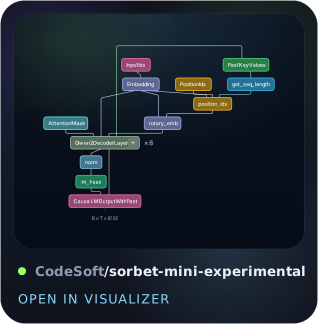
- Arch: Qwen2ForCausalLM (native in transformers and llama.cpp)
- Shape: h192 × 8 layers, heads 6 (dim 32), GQA kv=1, inter 576, tied embeddings
- Vocab: 8192 (same tokenizer as the sorbet-25m family)
- Params: 4,920,512 total | bf16 ≈ 9.9 MB | Q8_0 ≈ 5.2 MB
- Context: 256 train / up to 512 inference
Training recipe
Architecture graph
| knob | value |
|---|---|
| tokens | 149,999,872 (~37× Chinchilla) |
| steps | 1144 @ 512 seqs/step (seq 256) |
| data | TinyStories |
| precision | bf16, 8-bit AdamW |
| optimizer | AdamW lr 3e-4 → 1e-5 cosine, wd 0.1 (no decay on emb/norm), grad clip 1.0 |
| hardware | RTX 5060 Ti 16GB |
Result: train loss 8.13 → 2.81, val perplexity 3595 → 19.47.
Run it
# very close to f16 (recommended)
llama-completion -m sorbet-mini-experimental-q8_0.gguf \
-p "Once upon a time," -n 128 --temp 0.8 --top-p 0.95
# reference full-precision build
llama-cli -m sorbet-mini-experimental-f16.gguf -p "Hello, " -n 32
Run the safetensors (transformers)
from transformers import AutoTokenizer, AutoModelForCausalLM
import torch
tok = AutoTokenizer.from_pretrained("CodeSoft/sorbet-mini-experimental")
model = AutoModelForCausalLM.from_pretrained("CodeSoft/sorbet-mini-experimental", dtype=torch.bfloat16)
# model.to("cuda") # if you have a GPU
prompt = "Once upon a time,"
ids = tok(prompt, return_tensors="pt").input_ids
out = model.generate(ids, max_new_tokens=128, do_sample=True,
temperature=0.8, top_p=0.95)
print(tok.decode(out[0], skip_special_tokens=True))
- Downloads last month
- -