
Instructions to use anezatra/gpt2-samsum-124M with libraries, inference providers, notebooks, and local apps. Follow these links to get started.
- Libraries
- Transformers
How to use anezatra/gpt2-samsum-124M with Transformers:
# Use a pipeline as a high-level helper from transformers import pipeline pipe = pipeline("text-generation", model="anezatra/gpt2-samsum-124M")# Load model directly from transformers import AutoTokenizer, AutoModelForCausalLM tokenizer = AutoTokenizer.from_pretrained("anezatra/gpt2-samsum-124M") model = AutoModelForCausalLM.from_pretrained("anezatra/gpt2-samsum-124M") - Notebooks
- Google Colab
- Kaggle
- Local Apps
- vLLM
How to use anezatra/gpt2-samsum-124M with vLLM:
Install from pip and serve model
# Install vLLM from pip: pip install vllm # Start the vLLM server: vllm serve "anezatra/gpt2-samsum-124M" # Call the server using curl (OpenAI-compatible API): curl -X POST "http://localhost:8000/v1/completions" \ -H "Content-Type: application/json" \ --data '{ "model": "anezatra/gpt2-samsum-124M", "prompt": "Once upon a time,", "max_tokens": 512, "temperature": 0.5 }'Use Docker
docker model run hf.co/anezatra/gpt2-samsum-124M
- SGLang
How to use anezatra/gpt2-samsum-124M with SGLang:
Install from pip and serve model
# Install SGLang from pip: pip install sglang # Start the SGLang server: python3 -m sglang.launch_server \ --model-path "anezatra/gpt2-samsum-124M" \ --host 0.0.0.0 \ --port 30000 # Call the server using curl (OpenAI-compatible API): curl -X POST "http://localhost:30000/v1/completions" \ -H "Content-Type: application/json" \ --data '{ "model": "anezatra/gpt2-samsum-124M", "prompt": "Once upon a time,", "max_tokens": 512, "temperature": 0.5 }'Use Docker images
docker run --gpus all \ --shm-size 32g \ -p 30000:30000 \ -v ~/.cache/huggingface:/root/.cache/huggingface \ --env "HF_TOKEN=<secret>" \ --ipc=host \ lmsysorg/sglang:latest \ python3 -m sglang.launch_server \ --model-path "anezatra/gpt2-samsum-124M" \ --host 0.0.0.0 \ --port 30000 # Call the server using curl (OpenAI-compatible API): curl -X POST "http://localhost:30000/v1/completions" \ -H "Content-Type: application/json" \ --data '{ "model": "anezatra/gpt2-samsum-124M", "prompt": "Once upon a time,", "max_tokens": 512, "temperature": 0.5 }' - Docker Model Runner
How to use anezatra/gpt2-samsum-124M with Docker Model Runner:
docker model run hf.co/anezatra/gpt2-samsum-124M
OpenAI GPT-2 Samsum
Model description
This model has been trained with the SAMSum dataset. The SAMSum dataset contains approximately 16,000 conversational dialogues accompanied by summaries. These conversations were created and written by linguists proficient in fluent English. Linguists were instructed to create conversations that reflect the ratio of topics found in real-life journalistic conversations similar to their daily written conversations. The style and tone vary; conversations can be informal, semi-formal, or formal, and may include slang terms, expressions, and spelling errors. Subsequently, the conversations were annotated with summaries. The summaries are expected to be concise summaries of what people were talking about during the conversation, written in the third person. The SAMSum dataset was prepared by the Samsung Research Institute Poland and is distributed for research purposes.
Training
This GPT-2 model is rated for an average of 1 hour with an L4 GPU.
Training Results
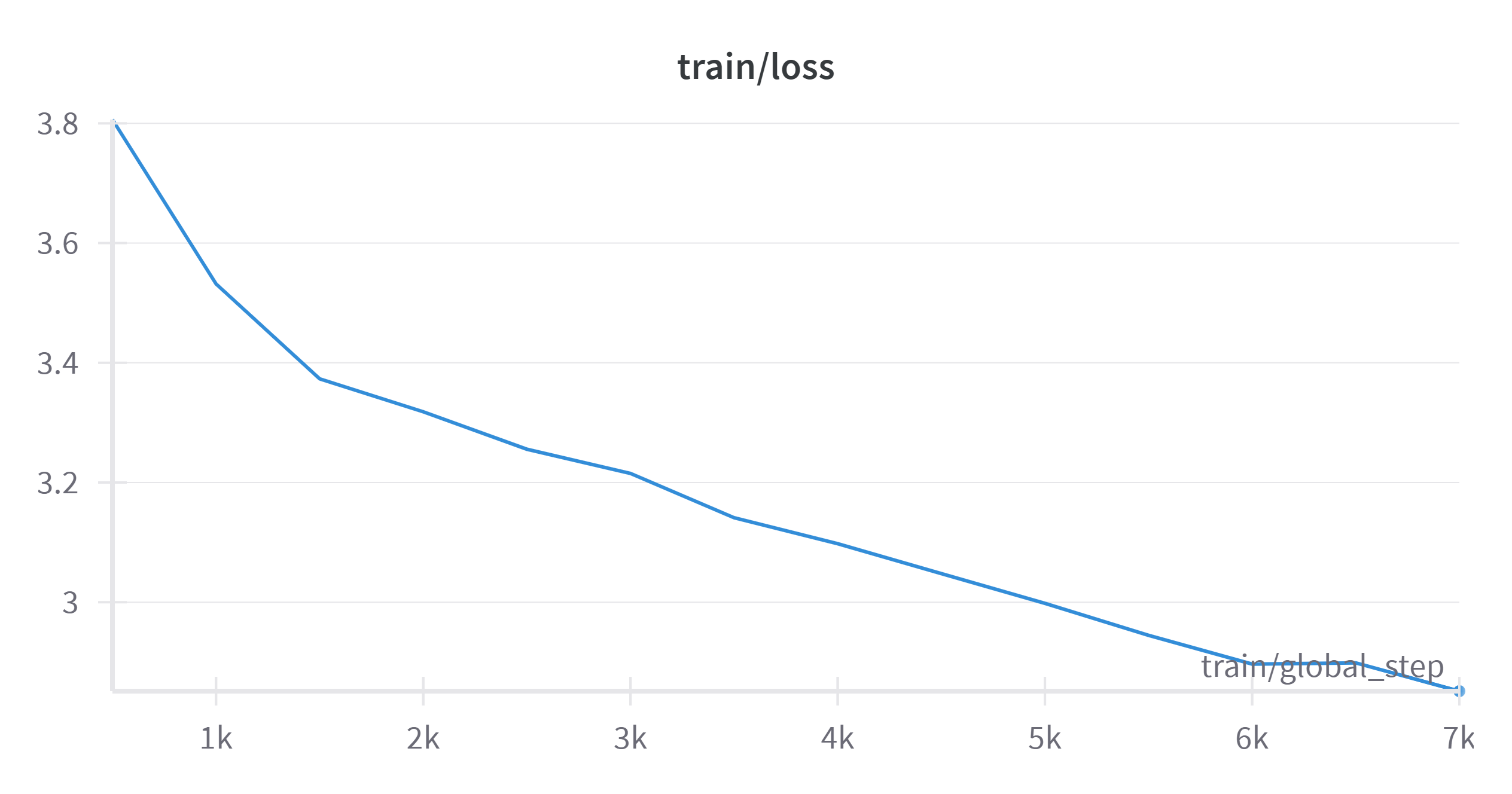
- Developed by: Anezatra
- Model type: GPT2
- Contacts: https://github.com/anezatra
- Downloads last month
- 3
