

ColorMAE: Exploring data-independent masking strategies in Masked AutoEncoders
Paper • 2407.13036 • Published • 4
Image and Video Understanding Lab, AI Initiative, KAUST
Carlos Hinojosa, Shuming Liu, Bernard Ghanem
Paper ·
GitHub ·
Supplementary Material ·
Project ·
BibTeX
Can we enhance MAE performance beyond random masking without relying on input data or incurring additional computational costs?
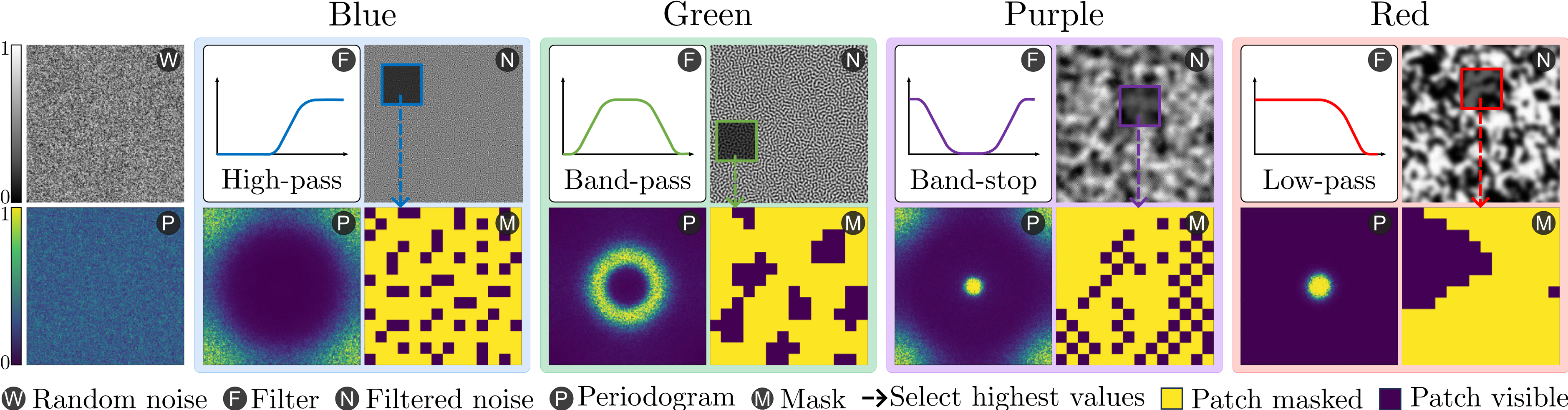
We introduce ColorMAE, a simple yet effective data-independent method which generates different binary mask patterns by filtering random noise. Drawing inspiration from color noise in image processing, we explore four types of filters to yield mask patterns with different spatial and semantic priors. ColorMAE requires no additional learnable parameters or computational overhead in the network, yet it significantly enhances the learned representations.
To get started with ColorMAE, follow these steps to set up the required environment and dependencies. This guide will walk you through creating a Conda environment, installing necessary packages, and setting up the project for use.
git clone https://github.com/carlosh93/ColorMAE.git
cd ColorMAE
conda create --prefix ./venv python=3.10.12 -y
conda activate ./venv
pip install torch==2.0.1 torchvision==0.15.2 torchaudio==2.0.2 --index-url https://download.pytorch.org/whl/cu118

pip install -U openmim && mim install mmpretrain==1.0.2 mmengine==0.8.4 mmcv==2.0.1

pip install yapf==0.40.1
Note: You can install mmpretrain as a Python package (using the above commands) or from source (see here).
At first, add the current folder to PYTHONPATH, so that Python can find your code. Run command in the current directory to add it.
Note: Please run it every time after you opened a new shell.
export PYTHONPATH=`pwd`:$PYTHONPATH
Prepare the ImageNet-2012 dataset according to the instruction. We provide a script and step by step guide here.
The following table provides the color noise patterns used in the paper
| Color Noise | Description | Link | Md5 |
|---|---|---|---|
| Green Noise | Mid-frequency component of noise. | Download | a76e71 |
| Blue Noise | High-frequency component of noise. | Download | ca6445 |
| Purple Noise | Noise with only high and low-frequency content. | Download | 590c8f |
| Red Noise | Low-frequency component of noise. | Download | 1dbcaa |
You can download these pre-generated color noise patterns and place them in the corresponding folder inside noise_colors directory of the project.
In the following tables we provide the pretrained and finetuned models with their corresponding results presented in the paper.
Note: This Hugging Face repository is the canonical checkpoint archive. The OSF links remain available as legacy mirrors. Safetensors are the recommended, security-first downloads.
ColorMAE-Green is the recommended model family. Blue, Purple, and Red are provided as the color-mask ablations reported in Table 1 of the paper. Random-mask checkpoints are intentionally not duplicated here because they are baseline experiments rather than ColorMAE variants.
| Pretraining | Pretrained | ImageNet-1K | ADE20K | COCO 768 | COCO 1024 |
|---|---|---|---|---|---|
| 100 epochs | checkpoint | 81.82 top-1 | 42.24 mIoU | 45.9 box AP / 40.9 mask AP | — |
| 300 epochs | checkpoint | 83.01 top-1 | 45.90 mIoU | 48.7 box AP / 43.3 mask AP | 50.4 box AP / 44.9 mask AP |
| 800 epochs | checkpoint | 83.61 top-1 | 49.18 mIoU | 49.5 box AP / 43.7 mask AP | — |
| 1600 epochs | checkpoint | 83.77 top-1 | 49.26 mIoU | 50.1 box AP / 44.3 mask AP | 51.5 box AP / 45.7 mask AP |
.safetensors contains only tensors and cannot execute pickle imports..pth at the same path preserves the exact model, optimizer, parameter-scheduler, epoch/iteration, and safe MessageHub runtime state. It passes PickleScan and resumes normally with MMEngine 0.8.4. Historical scalar-log buffers are intentionally reset because their HistoryBuffer objects caused the original unsafe-pickle warning; this does not change model or optimization state.To load safetensors directly, install safetensors, build the model from the corresponding config, and load the returned state dictionary:
from safetensors.torch import load_file

state_dict = load_file("checkpoint.safetensors", device="cpu")
model.load_state_dict(state_dict)
The corresponding Blue, Purple, and Red checkpoints for all four schedules are stored beside Green under ViT_Base/{100,300,800,1600}/{color}/. Each task directory has a canonical config.py; every raw resolved config and scalar-log shard is preserved under runs/<timestamp>/.
See the complete model zoo on GitHub, the checkpoint manifest, the security and resume conversion manifest, and the artifact manifest. The manifests record metrics, model/optimizer/scheduler fingerprints, source evidence, byte sizes, and SHA-256 hashes.
| Model | Params (M) | Flops (G) | Config | Download |
|---|---|---|---|---|
colormae_vit-base-p16_8xb512-amp-coslr-300e_in1k.py |
111.91 | 16.87 | config | model | log |
colormae_vit-base-p16_8xb512-amp-coslr-800e_in1k.py |
111.91 | 16.87 | config | model | log |
colormae_vit-base-p16_8xb512-amp-coslr-1600e_in1k.py |
111.91 | 16.87 | config | model | log |
| Model | Pretrain | Params (M) | Flops (G) | Top-1 (%) | Config | Download |
|---|---|---|---|---|---|---|
vit-base-p16_colormae-green-300e-pre_8xb128-coslr-100e_in1k |
ColorMAE-G 300-Epochs | 86.57 | 17.58 | 83.01 | config | model | log |
vit-base-p16_colormae-green-800e-pre_8xb128-coslr-100e_in1k |
ColorMAE-G 800-Epochs | 86.57 | 17.58 | 83.61 | config | model | log |
vit-base-p16_colormae-green-1600e-pre_8xb128-coslr-100e_in1k |
ColorMAE-G 1600-Epochs | 86.57 | 17.58 | 83.77 | config | model | log |
| Model | Pretrain | Params (M) | Flops (G) | mIoU (%) | Config | Download |
|---|---|---|---|---|---|---|
name |
ColorMAE-G 300-Epochs | xx.xx | xx.xx | 45.80 | config | N/A |
name |
ColorMAE-G 800-Epochs | xx.xx | xx.xx | 49.18 | config | N/A |
| Model | Pretrain | Params (M) | Flops (G) | $AP^{bbox}$ (%) | Config | Download |
|---|---|---|---|---|---|---|
name |
ColorMAE-G 300-Epochs | xx.xx | xx.xx | 48.70 | config | N/A |
name |
ColorMAE-G 800-Epochs | xx.xx | xx.xx | 49.50 | config | N/A |
Predict image
Download the vit-base-p16_colormae-green-300e-pre_8xb128-coslr-100e_in1k.pth pretrained classification model and place it inside the pretrained folder, then run:
from mmpretrain import ImageClassificationInferencer

image = 'https://github.com/open-mmlab/mmpretrain/raw/main/demo/demo.JPEG'
config = 'benchmarks/image_classification/configs/vit-base-p16_8xb128-coslr-100e_in1k.py'
checkpoint = 'pretrained/vit-base-p16_colormae-green-300e-pre_8xb128-coslr-100e_in1k.pth'
inferencer = ImageClassificationInferencer(model=config, pretrained=checkpoint, device='cuda')
result = inferencer(image)[0]
print(result['pred_class'])
print(result['pred_score'])
Use the pretrained model
Also, you can use the pretrained ColorMAE model to extract features.
import torch
from mmpretrain import get_model

config = "configs/colormae_vit-base-p16_8xb512-amp-coslr-300e_in1k.py"
checkpoint = "pretrained/colormae-green-epoch_300.pth"
model = get_model(model=config, pretrained=checkpoint)
inputs = torch.rand(1, 3, 224, 224)
out = model(inputs)
print(type(out))
# To extract features.
feats = model.extract_feat(inputs)
print(type(feats))
We use mmpretrain for pretraining the models similar to MAE. Please refer here for the instructions: PRETRAIN.md.
We evaluate transfer learning performance using our pre-trained ColorMAE models on different datasets and downstream tasks including: Image Classification, Semantic Segmentation, and Object Detection. Please refer to the FINETUNE.md file in the corresponding folder.
If you use our code or models in your research, please cite our work as follows:
@inproceedings{hinojosa2024colormae,
  title={ColorMAE: Exploring data-independent masking strategies in Masked AutoEncoders},
  author={Hinojosa, Carlos and Liu, Shuming and Ghanem, Bernard},
  booktitle={European Conference on Computer Vision},
  url={https://www.ecva.net/papers/eccv_2024/papers_ECCV/html/3072_ECCV_2024_paper.php}
  year={2024}
}
If you encounter the following warning at the beginning of pretraining:
UserWarning: Applied workaround for CuDNN issue, install nvrtc.so (Triggered internally at /opt/conda/conda-bld/pytorch_1682343995026/work/aten/src/ATen/native/cudnn/Conv_v8.cpp:80.)
  return F.conv2d(input, weight, bias, self.stride,
Solution: This warning indicates a missing or incorrectly linked nvrtc.so library in your environment. To resolve this issue, create a symbolic link to the appropriate libnvrtc.so file. Follow these steps:
cd venv/lib/ # Adjust the path if your environment is located elsewhere
ln -sfn libnvrtc.so.11.8.89 libnvrtc.so