Instructions to use continuum-ai/olmoe-1b-7b-compacted-5b with libraries, inference providers, notebooks, and local apps. Follow these links to get started.
- Libraries
- MLX
How to use continuum-ai/olmoe-1b-7b-compacted-5b with MLX:
# Make sure mlx-lm is installed # pip install --upgrade mlx-lm # Generate text with mlx-lm from mlx_lm import load, generate model, tokenizer = load("continuum-ai/olmoe-1b-7b-compacted-5b") prompt = "Write a story about Einstein" messages = [{"role": "user", "content": prompt}] prompt = tokenizer.apply_chat_template( messages, add_generation_prompt=True ) text = generate(model, tokenizer, prompt=prompt, verbose=True) - llama-cpp-python
How to use continuum-ai/olmoe-1b-7b-compacted-5b with llama-cpp-python:
# !pip install llama-cpp-python from llama_cpp import Llama llm = Llama.from_pretrained( repo_id="continuum-ai/olmoe-1b-7b-compacted-5b", filename="olmoe-1b-7b-compacted-5b.Q5_K_M.gguf", )
llm.create_chat_completion( messages = [ { "role": "user", "content": "What is the capital of France?" } ] ) - Notebooks
- Google Colab
- Kaggle
- Local Apps
- llama.cpp
How to use continuum-ai/olmoe-1b-7b-compacted-5b with llama.cpp:
Install from brew
brew install llama.cpp # Start a local OpenAI-compatible server with a web UI: llama-server -hf continuum-ai/olmoe-1b-7b-compacted-5b:Q5_K_M # Run inference directly in the terminal: llama-cli -hf continuum-ai/olmoe-1b-7b-compacted-5b:Q5_K_M
Install from WinGet (Windows)
winget install llama.cpp # Start a local OpenAI-compatible server with a web UI: llama-server -hf continuum-ai/olmoe-1b-7b-compacted-5b:Q5_K_M # Run inference directly in the terminal: llama-cli -hf continuum-ai/olmoe-1b-7b-compacted-5b:Q5_K_M
Use pre-built binary
# Download pre-built binary from: # https://github.com/ggerganov/llama.cpp/releases # Start a local OpenAI-compatible server with a web UI: ./llama-server -hf continuum-ai/olmoe-1b-7b-compacted-5b:Q5_K_M # Run inference directly in the terminal: ./llama-cli -hf continuum-ai/olmoe-1b-7b-compacted-5b:Q5_K_M
Build from source code
git clone https://github.com/ggerganov/llama.cpp.git cd llama.cpp cmake -B build cmake --build build -j --target llama-server llama-cli # Start a local OpenAI-compatible server with a web UI: ./build/bin/llama-server -hf continuum-ai/olmoe-1b-7b-compacted-5b:Q5_K_M # Run inference directly in the terminal: ./build/bin/llama-cli -hf continuum-ai/olmoe-1b-7b-compacted-5b:Q5_K_M
Use Docker
docker model run hf.co/continuum-ai/olmoe-1b-7b-compacted-5b:Q5_K_M
- LM Studio
- Jan
- vLLM
How to use continuum-ai/olmoe-1b-7b-compacted-5b with vLLM:
Install from pip and serve model
# Install vLLM from pip: pip install vllm # Start the vLLM server: vllm serve "continuum-ai/olmoe-1b-7b-compacted-5b" # Call the server using curl (OpenAI-compatible API): curl -X POST "http://localhost:8000/v1/chat/completions" \ -H "Content-Type: application/json" \ --data '{ "model": "continuum-ai/olmoe-1b-7b-compacted-5b", "messages": [ { "role": "user", "content": "What is the capital of France?" } ] }'Use Docker
docker model run hf.co/continuum-ai/olmoe-1b-7b-compacted-5b:Q5_K_M
- Ollama
How to use continuum-ai/olmoe-1b-7b-compacted-5b with Ollama:
ollama run hf.co/continuum-ai/olmoe-1b-7b-compacted-5b:Q5_K_M
- Unsloth Studio new
How to use continuum-ai/olmoe-1b-7b-compacted-5b with Unsloth Studio:
Install Unsloth Studio (macOS, Linux, WSL)
curl -fsSL https://unsloth.ai/install.sh | sh # Run unsloth studio unsloth studio -H 0.0.0.0 -p 8888 # Then open http://localhost:8888 in your browser # Search for continuum-ai/olmoe-1b-7b-compacted-5b to start chatting
Install Unsloth Studio (Windows)
irm https://unsloth.ai/install.ps1 | iex # Run unsloth studio unsloth studio -H 0.0.0.0 -p 8888 # Then open http://localhost:8888 in your browser # Search for continuum-ai/olmoe-1b-7b-compacted-5b to start chatting
Using HuggingFace Spaces for Unsloth
# No setup required # Open https://huggingface.co/spaces/unsloth/studio in your browser # Search for continuum-ai/olmoe-1b-7b-compacted-5b to start chatting
- MLX LM
How to use continuum-ai/olmoe-1b-7b-compacted-5b with MLX LM:
Generate or start a chat session
# Install MLX LM uv tool install mlx-lm # Interactive chat REPL mlx_lm.chat --model "continuum-ai/olmoe-1b-7b-compacted-5b"
Run an OpenAI-compatible server
# Install MLX LM uv tool install mlx-lm # Start the server mlx_lm.server --model "continuum-ai/olmoe-1b-7b-compacted-5b" # Calling the OpenAI-compatible server with curl curl -X POST "http://localhost:8000/v1/chat/completions" \ -H "Content-Type: application/json" \ --data '{ "model": "continuum-ai/olmoe-1b-7b-compacted-5b", "messages": [ {"role": "user", "content": "Hello"} ] }' - Docker Model Runner
How to use continuum-ai/olmoe-1b-7b-compacted-5b with Docker Model Runner:
docker model run hf.co/continuum-ai/olmoe-1b-7b-compacted-5b:Q5_K_M
- Lemonade
How to use continuum-ai/olmoe-1b-7b-compacted-5b with Lemonade:
Pull the model
# Download Lemonade from https://lemonade-server.ai/ lemonade pull continuum-ai/olmoe-1b-7b-compacted-5b:Q5_K_M
Run and chat with the model
lemonade run user.olmoe-1b-7b-compacted-5b-Q5_K_M
List all available models
lemonade list
llm.create_chat_completion(
messages = [
{
"role": "user",
"content": "What is the capital of France?"
}
]
)25% Experts Pruned, 36.0 HUMANEVAL (base 40.9)
OLMoE-1B-7B-0924-Instruct compacted via per-layer-normalized MoE expert pruning against the unmodified teacher.
- HUMANEVAL: 36.0 (base 40.9, ฮ -4.9)
- HUMANEVAL+PLUS: 31.7 (base 36.6, ฮ -4.9)
Every claim on this card is verified
Trust: self-attested ยท 2 benchmarks ยท 1 device tested
ForgeAlloy chain of custody ยท Download alloy ยท Merkle-chained
Cross-architecture validation artifact for ยง4.1.3.4. OLMoE-1B-7B (the smallest serious MoE on HF, fully-open Allen AI release) compacted from 7B to ~5B via calibration-aware MoE expert pruning on a held-out Python code corpus. Hardware-measured 36.0 HumanEval against unmodified base 40.9 (ฮ โ4.9, both Q5_K_M on the same 5090). The forge methodology that produced qwen3-coder-30b-a3b-compacted-19b-256k ports to a structurally distinct MoE family (OlmoeForCausalLM vs Qwen3MoeForCausalLM) without any modification to the forge scripts. The negative-baseline broad-corpus variant scored 28.0 โ the +8.0 swing from changing only the calibration corpus is the lever ยง4.1.3.4 names. This is a methodology proof point, not a tier-leading artifact; OLMoE is general-purpose, not coder-specific, so HumanEval is not its strength. Use the qwen3-coder-30b-a3b artifact if you need a fits-12-GB code model.
Benchmarks
| Benchmark | Score | Base | ฮ | Verified |
|---|---|---|---|---|
| humaneval | 36.0 | 40.9 | -4.9 | โ Result hash |
| humaneval_plus | 31.7 | 36.6 | -4.9 | โ Result hash |
What Changed (Base โ Forged)
| Base | Forged | Delta | |
|---|---|---|---|
| Pipeline | expert-activation-profile โ expert-prune โ quant โ eval | 1 cycles |
Runs On
| Device | Format | Size | Speed |
|---|---|---|---|
| NVIDIA GeForce RTX 5090 | Q5_K_M | 3.6GB | Verified |
| MacBook Pro 32GB | fp16 | 3.6GB | Expected |
| MacBook Air 16GB | Q8_0 | ~1.8GB | Expected |
| MacBook Air 8GB | Q4_K_M | ~1.1GB | Expected |
| iPhone / Android | Q4_K_M | ~1.1GB | Expected |
Quick Start
from transformers import AutoModelForCausalLM, AutoTokenizer
model = AutoModelForCausalLM.from_pretrained("continuum-ai/olmoe-1b-7b-compacted-5b",
torch_dtype="auto", device_map="auto")
tokenizer = AutoTokenizer.from_pretrained("continuum-ai/olmoe-1b-7b-compacted-5b")
inputs = tokenizer("def merge_sort(arr):", return_tensors="pt").to(model.device)
output = model.generate(**inputs, max_new_tokens=200)
print(tokenizer.decode(output[0], skip_special_tokens=True))
Methodology
Produced via MoE expert pruning, GGUF quantization. Full methodology, ablations, and per-stage rationale are in the methodology paper and the companion MODEL_METHODOLOGY.md in this repository. The pipeline ran as expert-activation-profile โ expert-prune โ quant โ eval over 1 cycle on NVIDIA GeForce RTX 5090.
Limitations
- HumanEval is not OLMoE's natural benchmark. OLMoE is general-purpose (Allen AI), not coder-specific. The 40.9 base / 36.0 student numbers are methodology validation, not tier-leading absolute quality. For a tier-leading code model, see
qwen3-coder-30b-a3b-compacted-19b-256k. - Validates ยง4.1.3.4 cross-architecture; does NOT compete on absolute numbers. This is the second empirical anchor for the methodology paper, alongside the Qwen3-Coder-30B-A3B v1. Together they demonstrate that the activation-count importance metric is architecture-invariant across two structurally distinct MoE families.
- Calibration corpus was 300 Python code examples. For non-code workloads (math/reasoning/general), the methodology will preserve OLMoE's general capability if profiled on a matching corpus โ but that's a separate forge run.
- Single GGUF tier shipped (Q5_K_M, 3.6 GB). Q4_K_M and Q8_0 will be added in v1.1 if there's demand.
Chain of Custody
Scan the QR or verify online. Download the alloy file to verify independently.
| What | Proof |
|---|---|
| Model weights | sha256:7f3b3c31279035cd5226f13cd602875ba... |
| Forged on | NVIDIA GeForce RTX 5090, ? |
| Published | huggingface โ 2026-04-08T16:36:55.037319+00:00 |
| Trust level | self-attested |
| Spec | ForgeAlloy โ Rust/Python/TypeScript |
Make Your Own
Forged with Continuum โ a distributed AI world that runs on your hardware.
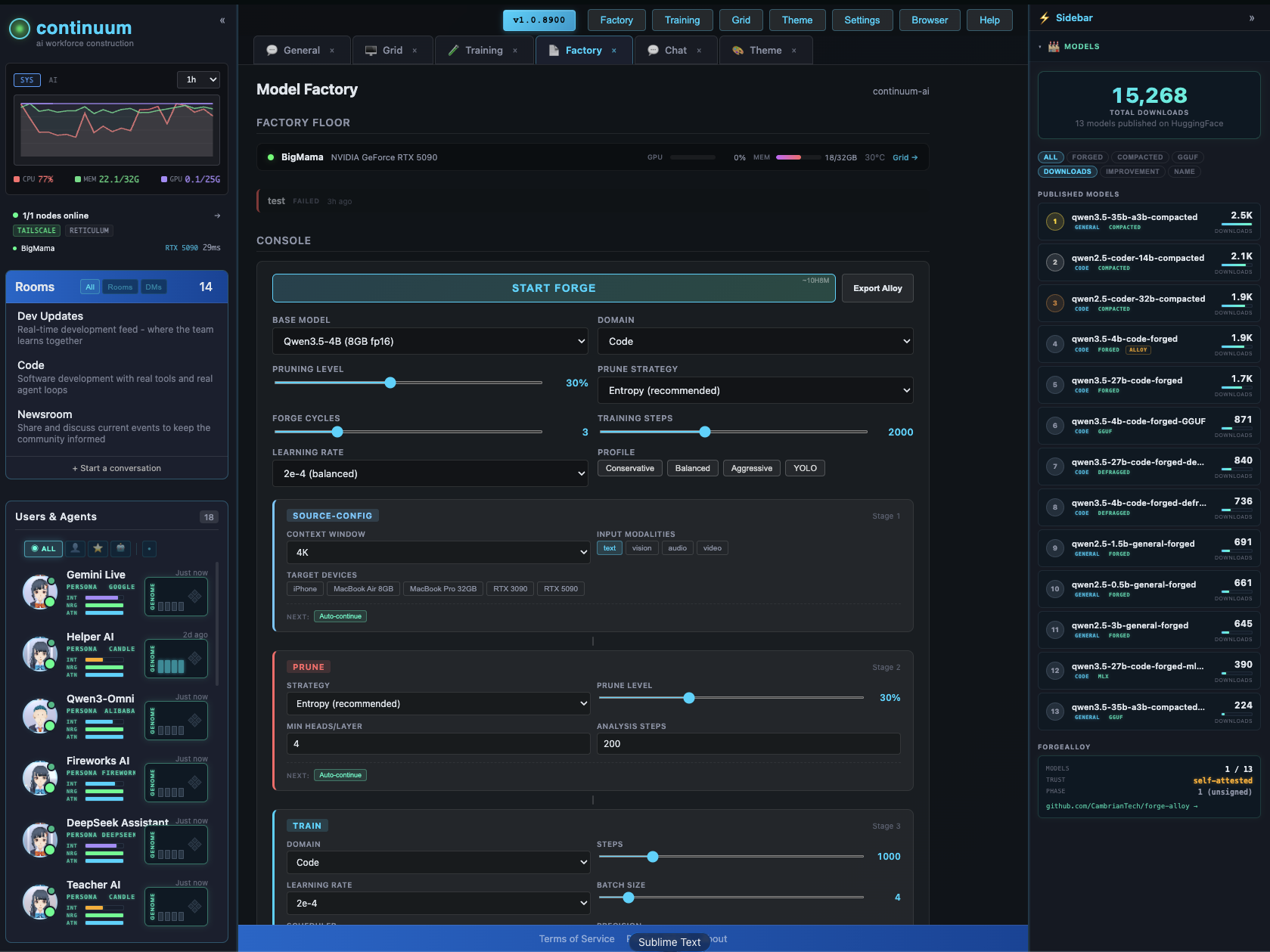
The Factory configurator lets you design and forge custom models visually โ context extension, pruning, LoRA, quantization, vision/audio modalities. Pick your target devices, the system figures out what fits.
GitHub ยท All Models ยท Forge-Alloy
License
apache-2.0
- Downloads last month
- 21
5-bit
Model tree for continuum-ai/olmoe-1b-7b-compacted-5b
Base model
allenai/OLMoE-1B-7B-0924

# !pip install llama-cpp-python from llama_cpp import Llama llm = Llama.from_pretrained( repo_id="continuum-ai/olmoe-1b-7b-compacted-5b", filename="olmoe-1b-7b-compacted-5b.Q5_K_M.gguf", )