
Instructions to use unsloth/Qwen3-Coder-480B-A35B-Instruct with libraries, inference providers, notebooks, and local apps. Follow these links to get started.
- Libraries
- Transformers
How to use unsloth/Qwen3-Coder-480B-A35B-Instruct with Transformers:
# Use a pipeline as a high-level helper from transformers import pipeline pipe = pipeline("text-generation", model="unsloth/Qwen3-Coder-480B-A35B-Instruct") messages = [ {"role": "user", "content": "Who are you?"}, ] pipe(messages)# Load model directly from transformers import AutoTokenizer, AutoModelForCausalLM tokenizer = AutoTokenizer.from_pretrained("unsloth/Qwen3-Coder-480B-A35B-Instruct") model = AutoModelForCausalLM.from_pretrained("unsloth/Qwen3-Coder-480B-A35B-Instruct") messages = [ {"role": "user", "content": "Who are you?"}, ] inputs = tokenizer.apply_chat_template( messages, add_generation_prompt=True, tokenize=True, return_dict=True, return_tensors="pt", ).to(model.device) outputs = model.generate(**inputs, max_new_tokens=40) print(tokenizer.decode(outputs[0][inputs["input_ids"].shape[-1]:])) - Notebooks
- Google Colab
- Kaggle
- Local Apps
- vLLM
How to use unsloth/Qwen3-Coder-480B-A35B-Instruct with vLLM:
Install from pip and serve model
# Install vLLM from pip: pip install vllm # Start the vLLM server: vllm serve "unsloth/Qwen3-Coder-480B-A35B-Instruct" # Call the server using curl (OpenAI-compatible API): curl -X POST "http://localhost:8000/v1/chat/completions" \ -H "Content-Type: application/json" \ --data '{ "model": "unsloth/Qwen3-Coder-480B-A35B-Instruct", "messages": [ { "role": "user", "content": "What is the capital of France?" } ] }'Use Docker
docker model run hf.co/unsloth/Qwen3-Coder-480B-A35B-Instruct
- SGLang
How to use unsloth/Qwen3-Coder-480B-A35B-Instruct with SGLang:
Install from pip and serve model
# Install SGLang from pip: pip install sglang # Start the SGLang server: python3 -m sglang.launch_server \ --model-path "unsloth/Qwen3-Coder-480B-A35B-Instruct" \ --host 0.0.0.0 \ --port 30000 # Call the server using curl (OpenAI-compatible API): curl -X POST "http://localhost:30000/v1/chat/completions" \ -H "Content-Type: application/json" \ --data '{ "model": "unsloth/Qwen3-Coder-480B-A35B-Instruct", "messages": [ { "role": "user", "content": "What is the capital of France?" } ] }'Use Docker images
docker run --gpus all \ --shm-size 32g \ -p 30000:30000 \ -v ~/.cache/huggingface:/root/.cache/huggingface \ --env "HF_TOKEN=<secret>" \ --ipc=host \ lmsysorg/sglang:latest \ python3 -m sglang.launch_server \ --model-path "unsloth/Qwen3-Coder-480B-A35B-Instruct" \ --host 0.0.0.0 \ --port 30000 # Call the server using curl (OpenAI-compatible API): curl -X POST "http://localhost:30000/v1/chat/completions" \ -H "Content-Type: application/json" \ --data '{ "model": "unsloth/Qwen3-Coder-480B-A35B-Instruct", "messages": [ { "role": "user", "content": "What is the capital of France?" } ] }' - Unsloth Studio new
How to use unsloth/Qwen3-Coder-480B-A35B-Instruct with Unsloth Studio:
Install Unsloth Studio (macOS, Linux, WSL)
curl -fsSL https://unsloth.ai/install.sh | sh # Run unsloth studio unsloth studio -H 0.0.0.0 -p 8888 # Then open http://localhost:8888 in your browser # Search for unsloth/Qwen3-Coder-480B-A35B-Instruct to start chatting
Install Unsloth Studio (Windows)
irm https://unsloth.ai/install.ps1 | iex # Run unsloth studio unsloth studio -H 0.0.0.0 -p 8888 # Then open http://localhost:8888 in your browser # Search for unsloth/Qwen3-Coder-480B-A35B-Instruct to start chatting
Using HuggingFace Spaces for Unsloth
# No setup required # Open https://huggingface.co/spaces/unsloth/studio in your browser # Search for unsloth/Qwen3-Coder-480B-A35B-Instruct to start chatting
Load model with FastModel
pip install unsloth from unsloth import FastModel model, tokenizer = FastModel.from_pretrained( model_name="unsloth/Qwen3-Coder-480B-A35B-Instruct", max_seq_length=2048, ) - Docker Model Runner
How to use unsloth/Qwen3-Coder-480B-A35B-Instruct with Docker Model Runner:
docker model run hf.co/unsloth/Qwen3-Coder-480B-A35B-Instruct
See our collection for all versions of Qwen3 including GGUF, 4-bit & 16-bit formats.
Learn to run Qwen3-Coder correctly - Read our Guide.
Unsloth Dynamic 2.0 achieves superior accuracy & outperforms other leading quants.
✨ Read our Qwen3-Coder Guide here!
- Fine-tune Qwen3 (14B) for free using our Google Colab notebook!
- Read our Blog about Qwen3 support: unsloth.ai/blog/qwen3
- View the rest of our notebooks in our docs here.
- Run & export your fine-tuned model to Ollama, llama.cpp or HF.
| Unsloth supports | Free Notebooks | Performance | Memory use |
|---|---|---|---|
| Qwen3 (14B) | ▶️ Start on Colab | 3x faster | 70% less |
| GRPO with Qwen3 (8B) | ▶️ Start on Colab | 3x faster | 80% less |
| Llama-3.2 (3B) | ▶️ Start on Colab | 2.4x faster | 58% less |
| Llama-3.2 (11B vision) | ▶️ Start on Colab | 2x faster | 60% less |
| Qwen2.5 (7B) | ▶️ Start on Colab | 2x faster | 60% less |
Qwen3-Coder-480B-A35B-Instruct
Highlights
Today, we're announcing Qwen3-Coder, our most agentic code model to date. Qwen3-Coder is available in multiple sizes, but we're excited to introduce its most powerful variant first: Qwen3-Coder-480B-A35B-Instruct. featuring the following key enhancements:
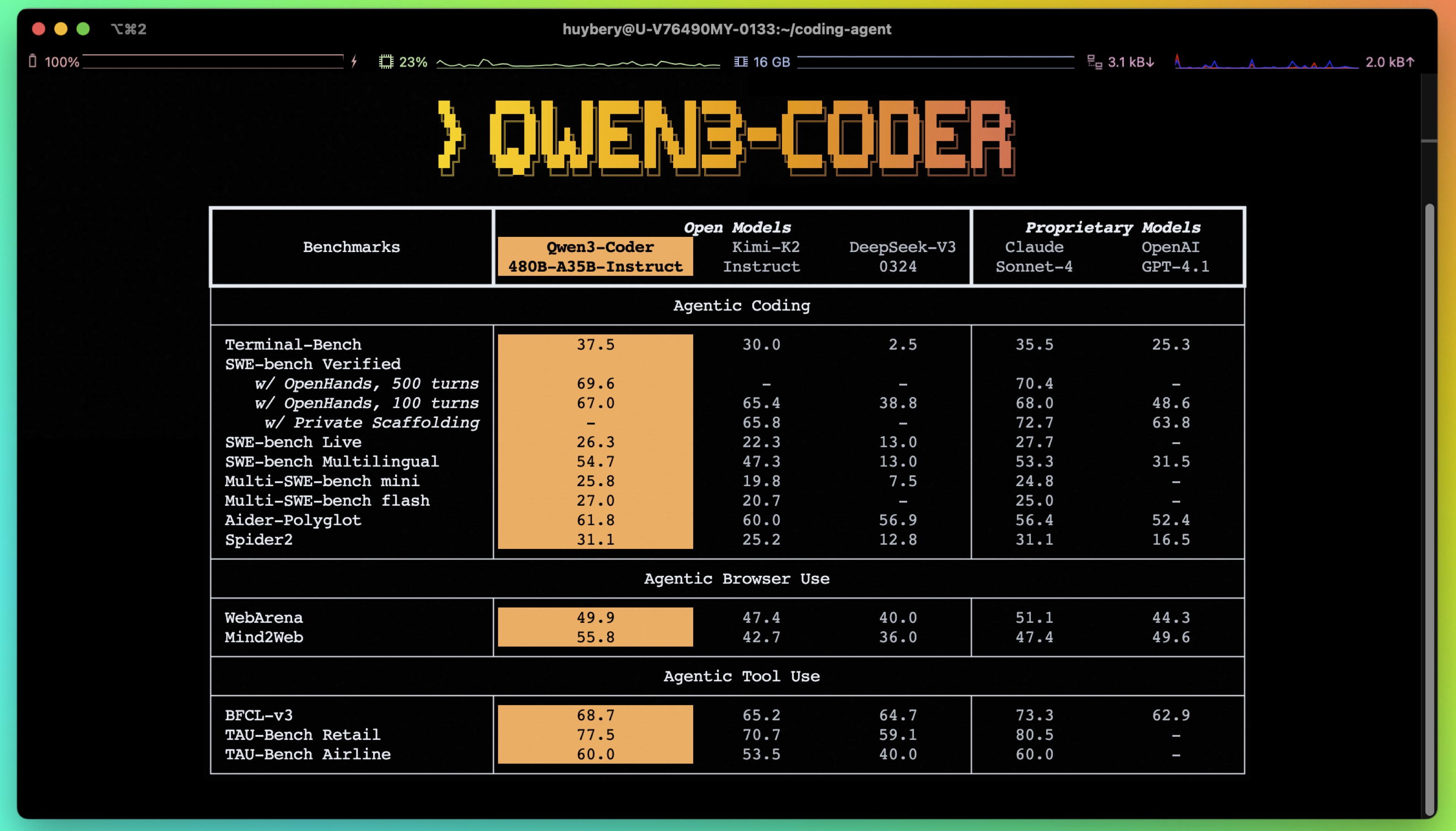
- Significant Performance among open models on Agentic Coding, Agentic Browser-Use, and other foundational coding tasks, achieving results comparable to Claude Sonnet.
- Long-context Capabilities with native support for 256K tokens, extendable up to 1M tokens using Yarn, optimized for repository-scale understanding.
- Agentic Coding supporting for most platfrom such as Qwen Code, CLINE, featuring a specially designed function call format.
Model Overview
Qwen3-480B-A35B-Instruct has the following features:
- Type: Causal Language Models
- Training Stage: Pretraining & Post-training
- Number of Parameters: 480B in total and 35B activated
- Number of Layers: 62
- Number of Attention Heads (GQA): 96 for Q and 8 for KV
- Number of Experts: 160
- Number of Activated Experts: 8
- Context Length: 262,144 natively.
NOTE: This model supports only non-thinking mode and does not generate <think></think> blocks in its output. Meanwhile, specifying enable_thinking=False is no longer required.
For more details, including benchmark evaluation, hardware requirements, and inference performance, please refer to our blog, GitHub, and Documentation.
Quickstart
We advise you to use the latest version of transformers.
With transformers<4.51.0, you will encounter the following error:
KeyError: 'qwen3_moe'
The following contains a code snippet illustrating how to use the model generate content based on given inputs.
from transformers import AutoModelForCausalLM, AutoTokenizer
model_name = "Qwen/Qwen3-480B-A35B-Instruct"
# load the tokenizer and the model
tokenizer = AutoTokenizer.from_pretrained(model_name)
model = AutoModelForCausalLM.from_pretrained(
model_name,
torch_dtype="auto",
device_map="auto"
)
# prepare the model input
prompt = "Write a quick sort algorithm."
messages = [
{"role": "user", "content": prompt}
]
text = tokenizer.apply_chat_template(
messages,
tokenize=False,
add_generation_prompt=True,
)
model_inputs = tokenizer([text], return_tensors="pt").to(model.device)
# conduct text completion
generated_ids = model.generate(
**model_inputs,
max_new_tokens=65536
)
output_ids = generated_ids[0][len(model_inputs.input_ids[0]):].tolist()
content = tokenizer.decode(output_ids, skip_special_tokens=True)
print("content:", content)
Note: If you encounter out-of-memory (OOM) issues, consider reducing the context length to a shorter value, such as 32,768.
For local use, applications such as Ollama, LMStudio, MLX-LM, llama.cpp, and KTransformers have also supported Qwen3.
Agentic Coding
Qwen3-Coder excels in tool calling capabilities.
You can simply define or use any tools as following example.
# Your tool implementation
def square_the_number(num: float) -> dict:
return num ** 2
# Define Tools
tools=[
{
"type":"function",
"function":{
"name": "square_the_number",
"description": "output the square of the number.",
"parameters": {
"type": "object",
"required": ["input_num"],
"properties": {
'input_num': {
'type': 'number',
'description': 'input_num is a number that will be squared'
}
},
}
}
}
]
import OpenAI
# Define LLM
client = OpenAI(
# Use a custom endpoint compatible with OpenAI API
base_url='http://localhost:8000/v1', # api_base
api_key="EMPTY"
)
messages = [{'role': 'user', 'content': 'square the number 1024'}]
completion = client.chat.completions.create(
messages=messages,
model="Qwen3-480B-A35B-Instruct",
max_tokens=65536,
tools=tools,
)
print(completion.choice[0])
Best Practices
To achieve optimal performance, we recommend the following settings:
Sampling Parameters:
- We suggest using
temperature=0.7,top_p=0.8,top_k=20,repetition_penalty=1.05.
- We suggest using
Adequate Output Length: We recommend using an output length of 65,536 tokens for most queries, which is adequate for instruct models.
Citation
If you find our work helpful, feel free to give us a cite.
@misc{qwen3technicalreport,
title={Qwen3 Technical Report},
author={Qwen Team},
year={2025},
eprint={2505.09388},
archivePrefix={arXiv},
primaryClass={cs.CL},
url={https://arxiv.org/abs/2505.09388},
}
- Downloads last month
- 56
Model tree for unsloth/Qwen3-Coder-480B-A35B-Instruct
Base model
Qwen/Qwen3-Coder-480B-A35B-Instruct
