
from diffusers import ControlNetModel, StableDiffusionControlNetPipeline

controlnet = ControlNetModel.from_pretrained("valknar/graffiti")
pipe = StableDiffusionControlNetPipeline.from_pretrained(
	"Lykon/DreamShaper", controlnet=controlnet
)artificialhoney/graffiti
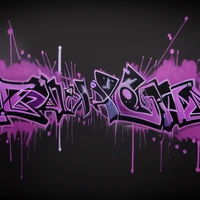
These are controlnet weights trained on Lykon/DreamShaper with a dataset from artificialhoney/graffiti.
You can create pretty pieces by passing an input sketch image to controlnet.

A good resource for tag fonts is dafont.com.
Usage
Following examples use a CLI to diffusers, which you can find on GitHub:
# Define base prompt
prompt="graffiti on black background, in the colors purple and yellow"
# Extend prompt and add compel syntax (https://github.com/damian0815/compel)
prompt=$(giger prompt "$prompt" --rendering_engine "Octane Render" --lightning_style "Cinematic" --resolution "8k" --compel_style "subtle")
# ('graffiti on black background, in the colors purple and yellow', 'Octane Render, Cinematic, 8k').and()
# Generate image
echo "$prompt" | giger image --output ./graffiti --name sketch --seed 0 --batch_count 10 --width 768 --height 432 --lora_model "OedoSoldier/detail-tweaker-lora" --lora_filename "add_detail.safetensors" --lora_scale 0.75 --input ./images/sketch.png --controlnet_model "artificialhoney/graffiti" --controlnet_conditioning_scale 0.45
Examples
Graffiti on black background, in the colors purple and yellow


Graffiti on black background, in the colors purple and yellow, by 1Up Crew


- Downloads last month
- 13
Model tree for valknar/graffiti
Base model
Lykon/DreamShaper